Automated and recurring workflowsLaunch recurring processes automatically and keep every step assigned and tracked in real time.
Task segregation and fluid assignmentSeparate responsibilities by role and route personal TODOs to the right owner without friction.
Decision and interaction digitalisationReplace email chains and meeting loops with structured digital decisions across internal and external stakeholders.
Verified features
What is actually covered in the app
These items are reflected in the current product scope and the existing implementation surface.
Automated processes
Task segregation
Real-time task tracking
Real product
Real screenshots, not mockups
What you see below is the actual interface of Workflow app, captured from a live instance, not a generated illustration.
15sys.com/app/workflow
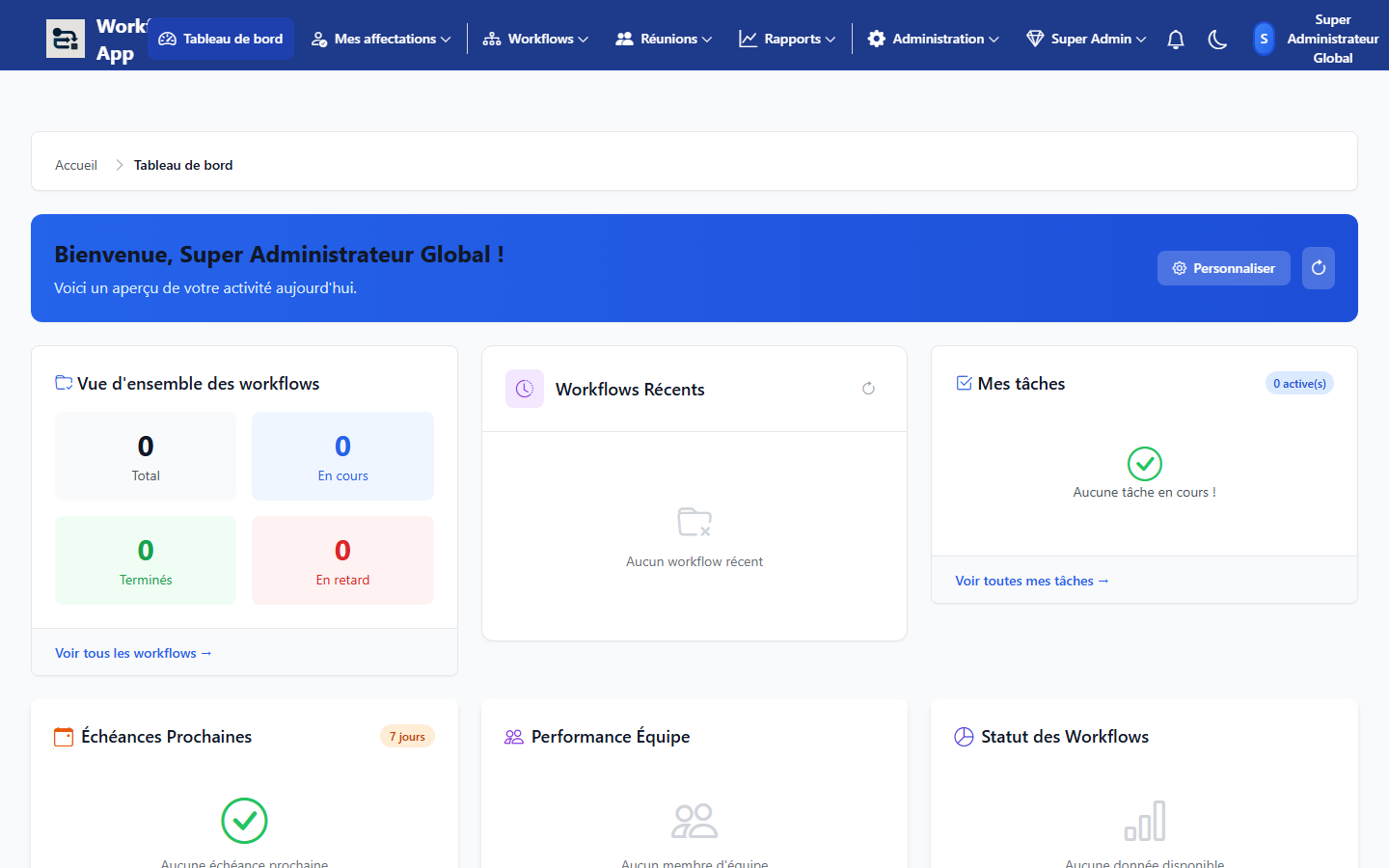
Workflow Dashboard
Personalized home view with tracking widgets (active workflows, assigned tasks, upcoming deadlines, team performance).
15sys.com/app/workflow
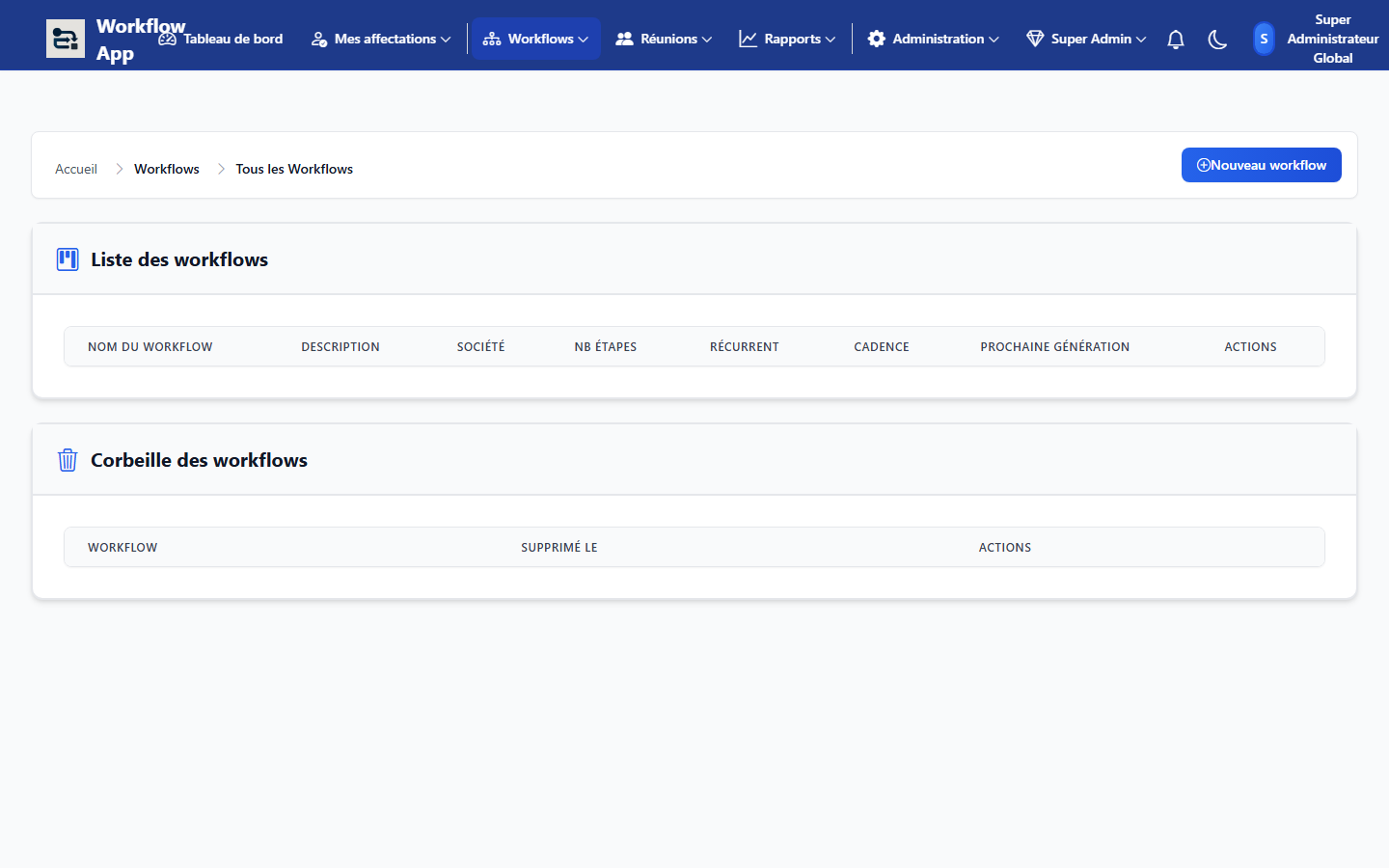
Workflows List
Admin page listing all of the organization's workflows with company, step count, recurrence, and next generation date.
15sys.com/app/workflow
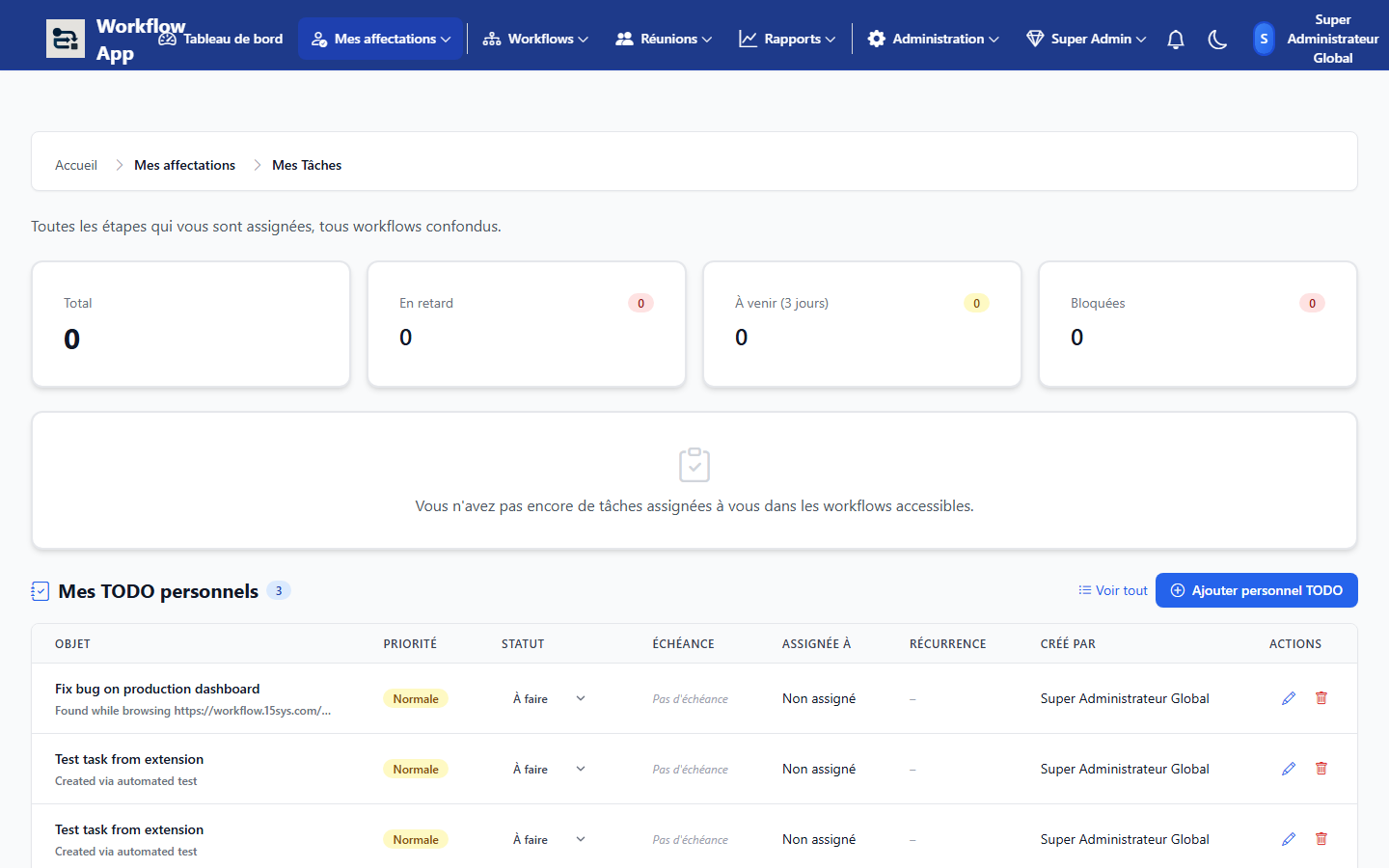
My Tasks & TODOs
View of assigned tasks and personal to-dos, showing priority, status, due date, and creator for each item.
Workflow app helps you automate and reengineer business processes end to end: recurring workflows, role-based task segregation, personal TODOs, real-time tracking and fluid assignment. It reduces time lost in emails and meetings, digitises decisions and interactions between internal and external stakeholders, and gives managers a clear view of performance and bottlenecks for continuous improvement.
Just shipped
What's new in Workflow app
The platform keeps evolving with features requested directly by teams using it every day.
New
Custom fields
Add your own fields, text, number, date, dropdown, multi-select, to any workflow, tailored to how your teams actually work.
New
Step dependencies
Make a step wait on another automatically, no more steps starting before their prerequisites are actually done.
New
Priority levels
Flag steps as Low, Normal, High or Urgent, urgent steps escalate reminders sooner, automatically.
New
Configurable automation rules
Build your own rules with a simple form: start the next step on status change, auto-start once a dependency clears, create a task when a document lands.
New
Bulk actions
Select several steps at once to reassign, change status or validate them together, one click instead of one by one.
New
Subtask checklists
Break a step into a checklist of small to-dos, tracked with a live progress badge, no separate step needed for every little thing.
New
Jobs & works (Affaires)
Group works under a job/matter, generate recurring works automatically, and drive a per-job task matrix with its own TODOs, plus Excel import with ready-made templates.
New
Timesheets
Log time against tasks and jobs, submit for approval with clear statuses, export a signed-off PDF, and let automatic reminders chase missing entries.
New
Task KPI report
A cross-team report on task throughput, delays and completion, exportable to Excel and PDF for management reviews.
Also new: import a workflow or a canevas library to reuse a process across companies, user invitations, a filterable unified calendar, colour-coded Gantt bars by status, a workload dashboard opened up to every role, and saved filter views on My Tasks.
Key Features
Automated Processes
Standardise and automate business processes from request to decision and execution.
Segregation of Duties
Define who requests, reviews, approves and executes to secure governance by design.
Real-Time Task Tracking
Track every open task, due date, delay and owner from one live operational view.
Recurring Process Automation
Automate weekly, monthly and periodic process cycles without manual relaunch.
Personal TODO and Fluid Assignment
Each user has a personal TODO queue with priority, ownership and smooth reassignment.
Less Email and Meeting Overhead
Replace manual follow-ups with automated routing, alerts and traceable digital workflows.
Digital Collaboration Internal/External
Coordinate teams, departments, suppliers and partners through one shared decision workflow.
Digitalised Decisions
Every decision is recorded, timestamped and accessible for management review and accountability.
Performance and Bottleneck Monitoring
Monitor throughput, delays and bottlenecks to act quickly on weak process points.
Process Optimization and Reengineering
Use process KPIs to improve operations continuously and redesign inefficient workflows.
Custom Fields per Workflow
Model each process with your own fields instead of forcing every workflow into the same rigid shape.
Dependencies and Rule-Based Automation
Sequence steps with real dependencies and let configurable rules start, notify or reassign work without manual follow-up.
Who is it for?
Built for structured execution and continuous improvement
Workflow app fits any organisation that wants to automate decisions, track tasks live and optimize processes.
Operations and quality leaders
Automate processes, digitise decisions and standardise interactions across internal and external stakeholders.
Managers and team leads
Control task segregation, fluid assignment and real-time execution tracking from one cockpit.
Continuous-improvement teams
Detect bottlenecks and drive process reengineering with performance-based insights.
Why choose Workflow app?
Management Time Savings
Cut email loops and meeting overhead with digital workflows and automatic assignments.
Decision Quality and Governance
Digital decisions and segregation of duties improve reliability, control and accountability.
Optimization and Reengineering
Track bottlenecks, act on weak points and drive measurable continuous improvement.
Take Workflow app with you, in your browser
The companion browser extension puts your workflow one click away, wherever you are on the web: capture a task or ticket from the active tab, get notified of due reminders, and pull up a shared credential without switching tabs.
Official Chrome Web Store listing One-click capture with screenshot Credentials with TOTP
Less coordination overhead and faster decision cycles.
02
Recurring processes with poor follow-up
Challenge : Repetitive workflows rely on manual reminders and create delays.
Solution : Recurring automation triggers personal TODOs, fluid assignment and live progress tracking.
Consistent execution, better SLA adherence and balanced workload.
03
No process performance visibility
Challenge : Without KPIs, bottlenecks remain hidden and improvement initiatives stall.
Solution : Workflow app tracks performance, highlights bottlenecks and supports process optimization and reengineering.
Data-driven management decisions and measurable operational gains.
Frequently Asked Questions
Does Workflow app support automated processes?
Yes, you can automate end-to-end processes with tasks, approvals and notifications.
Can task segregation be enforced?
Yes, roles and responsibilities are defined at each step to enforce segregation of duties.
Is task tracking real time?
Yes, every task is tracked live with statuses, deadlines and action history.
Can recurring processes be automated?
Yes, recurring workflows can be scheduled and executed automatically.
Is there a personal TODO list?
Yes, each user has a personal TODO queue with fluid assignment and prioritisation.
Does it reduce email and meeting time?
Yes, digitised workflows significantly reduce manual follow-ups and status meetings.
Can we monitor performance and bottlenecks?
Yes, process KPIs support optimization, reengineering and continuous improvement.
Can we add custom fields to a workflow?
Yes, every workflow can carry its own tailored fields (text, number, date, dropdown, multi-select), no development needed.
Can a step be blocked until another one finishes?
Yes, step dependencies prevent a step from starting until its prerequisites are resolved, with optional auto-start once it's clear.
Can the app suggest a schedule automatically?
Yes, based on each task's estimated duration and your daily capacity, a day-by-day schedule can be suggested by AI. You always stay in control: nothing changes until you approve the suggestion.
Can we manage jobs and works above the workflows?
Yes. A job (affaire) groups works (one-off or auto-generated recurring ones) with their own task matrix and TODOs. Jobs and works can be imported from Excel using ready-made templates.
Are there timesheets?
Yes. Each user logs time against tasks and jobs, submits the sheet for approval with clear statuses, and the PDF export produces a signed-off document. Automatic reminders chase missing entries, and a task KPI report exports to Excel and PDF.
Turn workflows into a performance lever
Deploy Workflow app to automate recurring processes, digitise decisions and continuously improve execution quality.